
On this page
On this page
ETH-MG web change IEEE (coordinator migration)
When you replace an ETH-MG21 / ETH-MG24 (including PoE), restoring a Zigbee2MQTT / ZHA backup is often not enough. Some end devices look up the coordinator by IEEE (EUI-64). A different factory chip address then looks like “reports still work, commands fail,” or joining never completes.
On ETH-MG, ZHA & Z2M → Coordinator IEEE migration (EZSP) writes the target EUI-64 to the Silicon Labs chip first, then stores a copy on the ESP32 host if that succeeds. Combined with the same EmberZNet network backup, most devices can keep the original PAN, network key, and bindings.
Applies to: ETH-MG21, ETH-MG24, ETH-MG21 POE, ETH-MG24 POE (Zigbee coordinator, EmberZNet / EZSP). The old device must also be Silicon Labs (another ETH-MG, ZBT-1P, or ZBM-MG21 / MG24).
Does not apply to: ETH-52P / ETH-52P7 (TI / zstack — see ETH-52P / ETH-52P7 change IEEE (coordinator migration)); router / Thread firmware; forcing a zstack backup onto Ember.
Defaults: web UI http://dongle.local/, Zigbee2MQTT tcp://dongle.local:6638, ZHA socket://dongle.local:6638. If mDNS is flaky, use the LAN IP.
Docs: Zigbee2MQTT: copying the coordinator IEEE · Migrate adapters · ZHA: migrate to a new adapter.
Before you start
- Back up before you change IEEE. A new address without a matching backup will not line up with host-side bindings; you will have to reset the integration or database
- Record the old coordinator IEEE, for example
70:D0:7E:FF:FE:E4:85:4A. Do not invent one - The new gateway must run coordinator firmware, not router / Thread
- Power the old coordinator down after the write. Two chips must not advertise the same IEEE on the same channel
- On Silicon Labs this is the active EUI-64 on the chip (not a TI secondary IEEE). After reboot, trust the address shown in the web UI and in Z2M / ZHA
Back up the network and record the IEEE
Zigbee2MQTT
- Frontend Settings → About → Coordinator IEEE Address
- Copy
coordinator_backup.jsonfrom the data folder (PAN, extended PAN, channel, network key) - Also keep
database.dbandconfiguration.yamlif you use them
The ember adapter expects backups from EZSP v12 or newer. Very old ezsp backups may not restore. See EmberZNet adapters.
ZHA
Note the coordinator IEEE. Migrate adapter takes an automatic backup; keep an export if you use one.
Keep the backup and IEEE as a pair
The IEEE you write must belong to that backup. Mixing two backups or two addresses often yields adapter state does not match or an extended PAN mismatch.
Write the IEEE in the web UI
- Open
http://dongle.local/or the gateway IP - Open ZHA & Z2M
- Expand Coordinator IEEE migration (EZSP)
- Enter the old coordinator address in Coordinator EUI-64 (radio & dongle)
- Tick the confirmation: write this EUI-64 to the chip and save it on the dongle
- Click Save. The host stores its copy only after the chip write succeeds
- Reboot the gateway so the web UI and Z2M / ZHA show the same IEEE
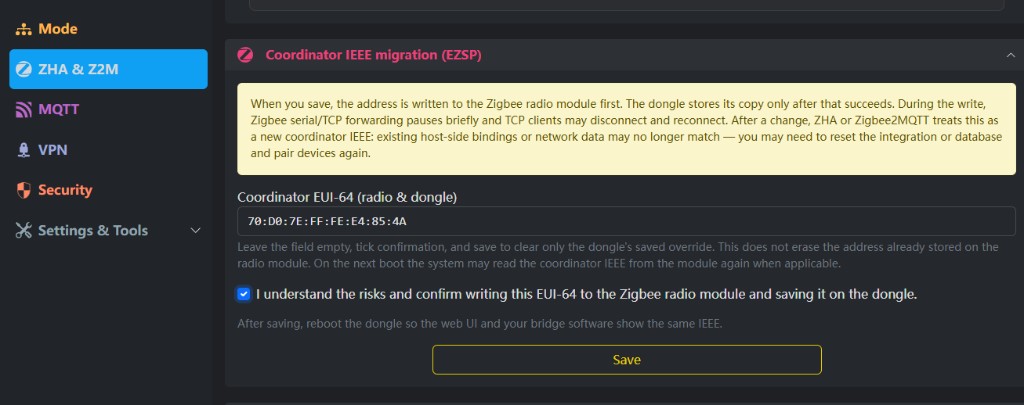
To clear only the host-side override (so the next boot may read the chip again): leave the field empty, confirm, and save. That does not erase the address already stored on the chip.
Over USB you can also use universal-silabs-flasher write-ieee. When the ETH-MG web UI opens, use this page instead of a serial dongle.
Restore the backup
Keep the old coordinator off. Do not run two Z2M / ZHA instances against the new gateway.
Zigbee2MQTT
Put the old coordinator_backup.json in the Z2M data folder (replace any empty new backup):
serial:
  port: tcp://dongle.local:6638
  # port: tcp://GATEWAY_IP:6638
  adapter: ember
  # adapter: ezsp
socat:
  enabled: false
Start only this Zigbee2MQTT instance. ember vs ezsp: Zigbee2MQTT with an Inswift coordinator.
If you change IEEE and skip the matching backup, host-side bindings will not match. The yellow banner says you may then need to reset the integration or database and pair again.
ZHA
Configure → Migrate adapter, new port socket://dongle.local:6638 (or the IP). If asked, enable Permanently replace the radio IEEE address. See Home Assistant ZHA: migrate to a new adapter.
Bring devices back
- Power-cycle Zigbee routers for ≥ 15 seconds (a whole-house cut is common when many mains routers exist)
- In Z2M / ZHA, confirm Coordinator IEEE is the old address, and devices both report and accept commands
- If you reuse the old gateway as a router, change its IEEE first, or leave it unpowered
Troubleshooting
| Symptom | Likely cause | What to try |
|---|---|---|
| Web UI and Z2M show different IEEE | No reboot, or only the host override was cleared | Reboot; trust the chip EUI |
| Reports OK, commands fail | IEEE changed but PAN / keys did not | Restore that Ember backup |
adapter state does not match | Backup and IEEE are from different networks | Use the IEEE from that backup |
| TCP drops during Save | Forwarding pauses by design | Wait for Save, reboot, then reconnect 6638 |
| Coming from a TI chip | Wrong stack | Do not use this page. See FAQ: migrating or ETH-52P / ETH-52P7 change IEEE (coordinator migration) |
| Chip is router firmware | No coordinator IEEE migration | Flash coordinator, or use ETH-MG router web CLI |
Related
Zigbee2MQTT setup · ZHA setup · FAQ · Flash ETH host over USB · ETH-MG21 / ETH-MG24 · ETH-MG POE · ETH-52P / ETH-52P7 change IEEE (coordinator migration)